

Asteroid Astrometry in Practice - archive SDSS
Archive Sloan Digital Sky Survey (SDSS)
The Sloan Digital Sky Survey (SDSS) programme ran from 2000 to 2007 at Apache Point Observatory in New Mexico; its MPC observatory code is 645. Observations were made with a 2.5-m reflecting telescope. The sky was imaged through five broadband filters (u, g, r, i, z). The CCD camera used has 30 chips, each 2048 x 2048 pixels in size. The telescope was on an alt-azimuth mount and remained fixed during an observation. The part of the sky passing across the field of view was imaged. Depending on the filter used, the limiting magnitude of detected objects was 21.3 to 22.2 magnitudes. The survey was primarily intended for supernova research, but the resulting CCD images also proved useful for asteroid astrometry. Although more than 20 years have passed since the observations, the images still contain many unknown objects.
Retrieving Images from the SDSS Archive
We will show how to find observations of asteroid 2001 UQ241. The asteroid is in the main asteroid belt, has been observed at six oppositions, and its orbital elements are sufficiently accurate for the object's ephemeris to be reliable and for the object to be located at its computed coordinates. First, use the MPC Database Search at the Minor Planet Center to determine which observations are recorded for the selected object.
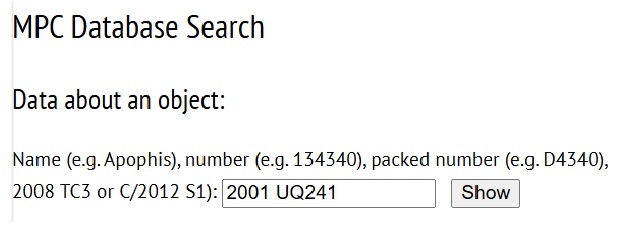
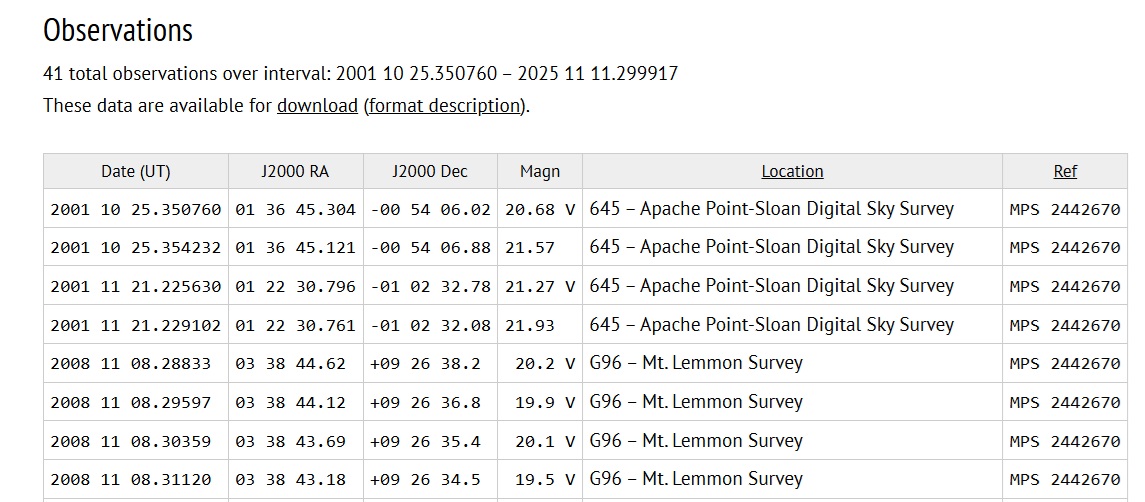
The system displays all information on the object - its orbital elements and all recorded observations - which can
also be downloaded and used locally. We can see that the MPC contains observations of asteroid 2001 UQ241
from Apache Point Observatory (645) on 25 October 2001 and 21 November 2001.
Next, use the Canadian Astronomy Data Center page to determine whether the relevant archive contains images
of the sky for the selected asteroid. In general, observations can be searched by several criteria: asteroid name or designation, existing observations, or orbital elements. In this example, specify that the system should search for
observations by designation.
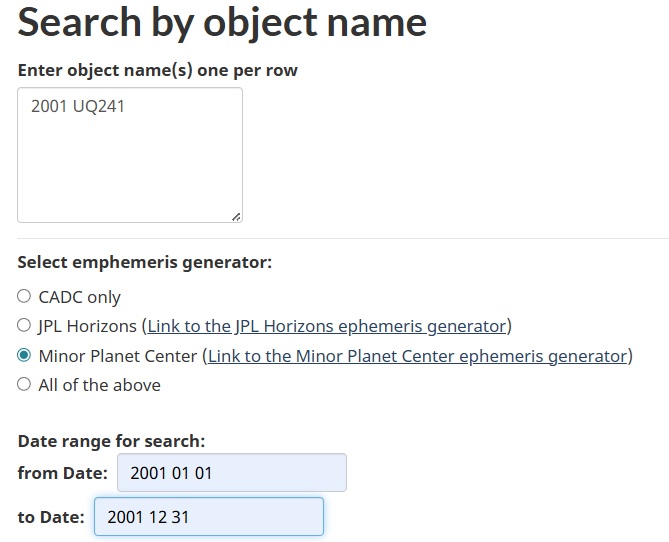

Restrict the search by selecting the period in which the system is to search for observations and by selecting the
observatory. Therefore, enter the year 2001 and specify that the application should search only the SDSS archive.
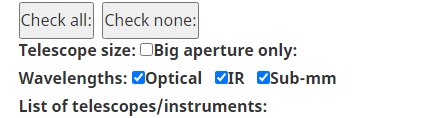
If a specific time period and archive are not selected, the search will take too long. First deselect all telescope
options (Check none), then select SDSS.

Then click Search and the program will search using the specified criteria. If the archive contains data satisfying the requested conditions, the system displays the relevant CCD images, observation time, filter used, exposure time, position of the sought asteroid on the CCD image, and the telescope used.
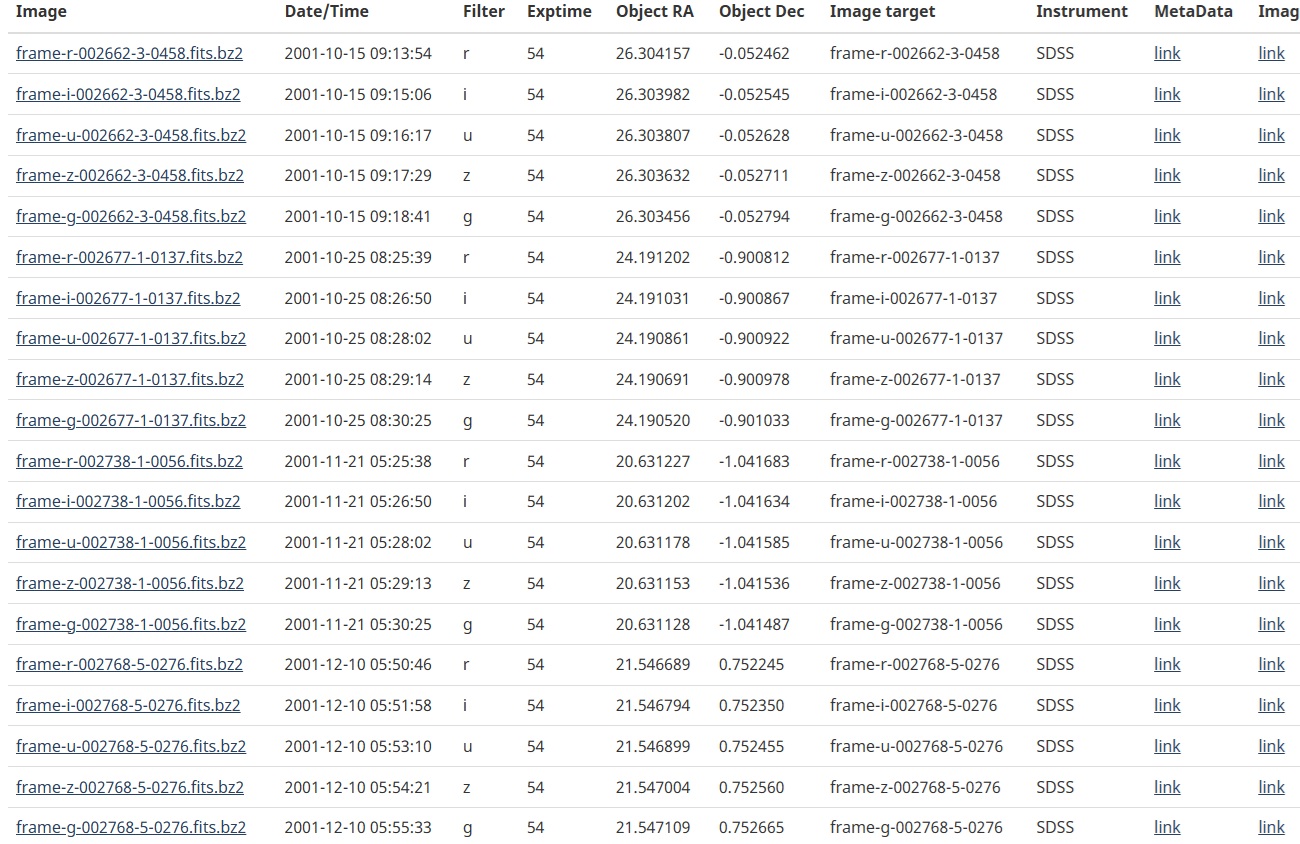
CADC found the asteroid on four nights: 15 October, 25 October, 21 November, and 10 December 2001. The MPC
database contains observations from 25 October and 21 November 2001; therefore, by measuring positions from
15 October and 10 December 2001, we extend the observational arc in both directions. In general, extending the
observed arc improves the accuracy of an object's orbital elements.
Each field was imaged through five filters: r, i, u, z, and g. For this purpose, use the r, i, and g images. Clicking the
CCD-image name (Image) downloads it to the computer. The files have the .bz2 extension. If the computer warns
that the file cannot be downloaded safely, select the option to keep it; the file will then be downloaded.
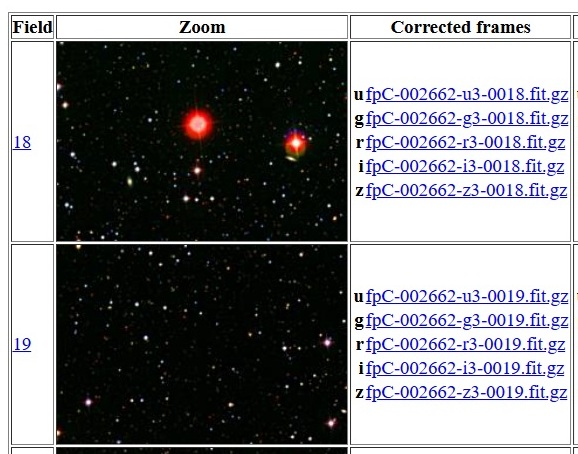
Another way to obtain the images is through the SDSS Run List for Data Release Stripe 82 - SN. From the image
name frame-r-002662-3-458.fits.bz2, find the corresponding download link. The CCD-image name contains the
filter used (r), the observing run identifier (2662), the column of the CCD chip used (3), and the sequential image
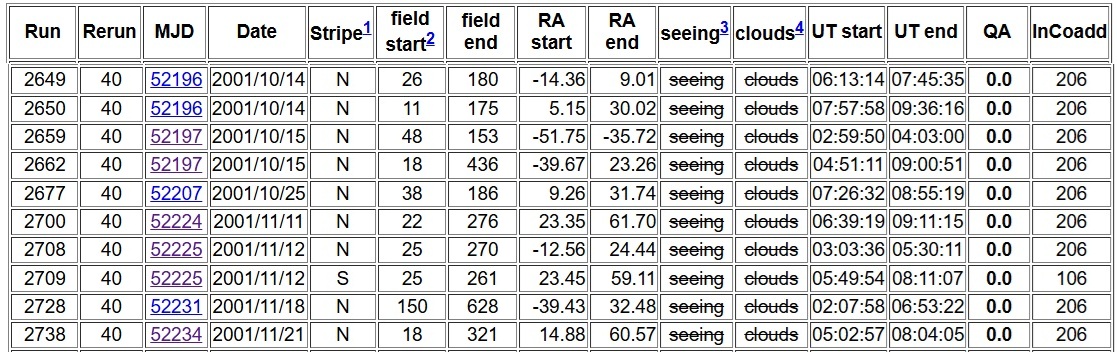
number (458). In the Run column, find row 2662; in that row, click the entry in the MJD 52197 column.
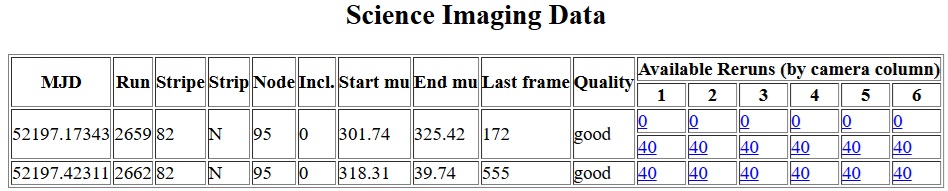
A new table opens. Find Run 2662, and in column 3 click number 40. This directs you to the image list ordered by sequential number, where image 458 can be found.
In the preceding table, note the Field end column. For observing run 2662 it gives 436; after moving to the next table, the Last frame column gives 555. On that day, 555 CCD fields were obtained, but only 436 are in the
archive. Thus, in this particular case, images no. 458 cannot be reached this way. If they were available, they would be downloaded by clicking the individual r, i, and g images in the Correted frames column.
Preparing FITS images
Unpack the downloaded files, for example with PeaZip. The files use 32-bit colour depth. If Astrometrica loads
them correctly, you may begin inspecting the images and measuring asteroid positions. If not, they must be
converted to 16-bit format. For FITS-file conversion, use the free program SIPS, which includes many useful astrometric and photometric functions.
You can download it from here:
 After loading the images into SIPS, click the 16 to 32 icon to perform the conversion, then click the diskette icon to
save from the horizontal menu. You can then work with the modified FITS files in Astrometrica.
After loading the images into SIPS, click the 16 to 32 icon to perform the conversion, then click the diskette icon to
save from the horizontal menu. You can then work with the modified FITS files in Astrometrica.
Astrometrica - Measuring Asteroids
Identifying Moving Objects
The CCD exposures are now stored on the computer and can be inspected. To identify moving objects, their
positions relative to stars must be determined accurately. I recommend for this purpose software Astrometrica. This
program is freeware and fully functional for 100 days; continued use requires purchase of a EUR 25 licence.
Instructions for working with it are available online
Setting Parameters for the SDSS Archive
For the program to measure accurately the coordinates of individual objects in the images, its configuration file
must be set for the particular observatory and instrument used to obtain the CCD images. Download the
configuration file for the SDSS archive and save it as 645.cfg: 645.cfg
After setting the parameters, load a triplet of images via
File - Load images. Locate the images obtained from the
database and select them.
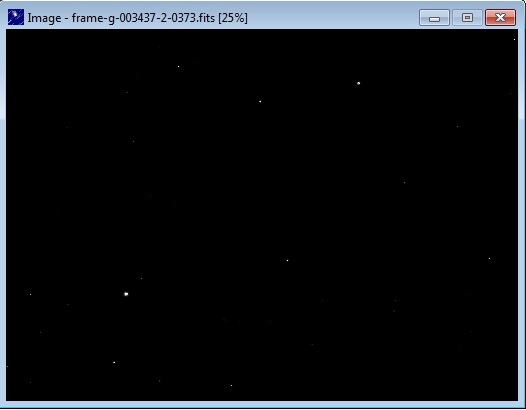
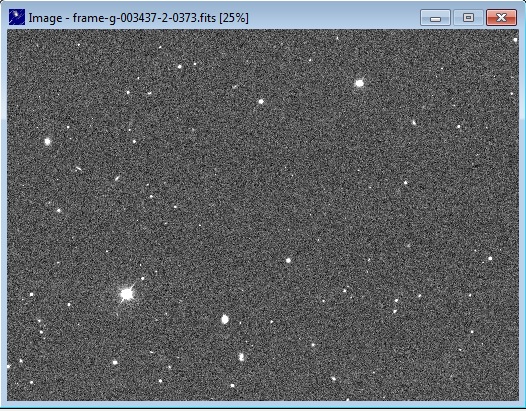
If the images show a black background and only a few stars, repeat the two conversion steps described above.
The images should then resemble the correctly displayed example.
Observation-Time Correction
Each time an image is opened, a window appears for entering the date and time when that exposure was obtained.
The time automatically displayed must be corrected according to the date on which the observations were made.
When loading, the window displays the time stored in the FITS file.
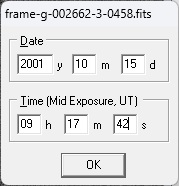
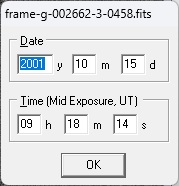
1997 07 01 - 1999 01 01 = -31 sec
1999 01 01 - 2006 01 01 = -32 sec
2006 01 01 - 2009 01 01 = -33 sec
2009 01 01 - 2012 07 01 = -34 sec
2012 07 01 - 2015 07 01 = -35 sec
2015 07 01 - 2017 01 01 = -36 sec
2017 01 01 - = -37 sec
During processing, correct the observation time according to the year in which the images were obtained. In this case, because the data are from 2001, subtract 32 seconds.
For the first image, the time read from the FITS data is 09:18:14. Subtract 32 seconds to obtain 09:17:42. Replace
the time in the window and click OK. Correct the time in this way for all three images. Next, click the fourth icon
from the left (Astrometric Data Reduction) or use the shortcut Ctrl+A. A window appears with coordinates also
given in the FITS header. These values are correct, so simply click OK. The Align Reference Stars window then
opens. Increase the magnitude limit to 20-21 to add more catalogue reference stars (shown in red), align them as
accurately as possible with the stars in the image using the arrow keys, and confirm. If the alignment is accurate,
the Data Reduction Result table appears, meaning that the studied star field can be inspected.

Identification and Verification
Now measure the coordinates and perform identification. Identification can be carried out with Known Object Overlay, function in the Tools menu. This function uses the MPCORB.DAT database, available from the
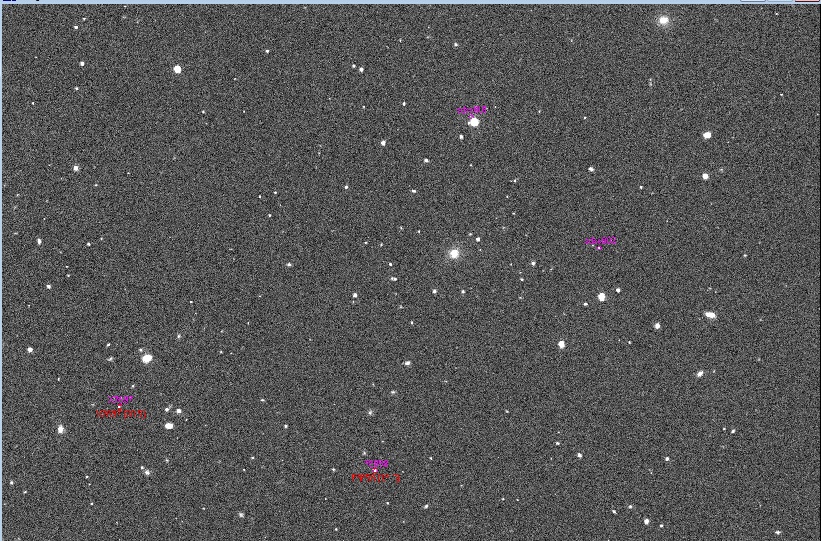
In this example, four unambiguously moving objects are present in the image. Two of them are known: (337697) 2001 TK255 and (155858) 2004 PT1, in the lower part of the image. The system did not recognise the other two asteroids; they may have very inaccurate orbits, or they may be new objects not yet recorded by the MPC. Both were measured and labelled sdss001 and sdss002.
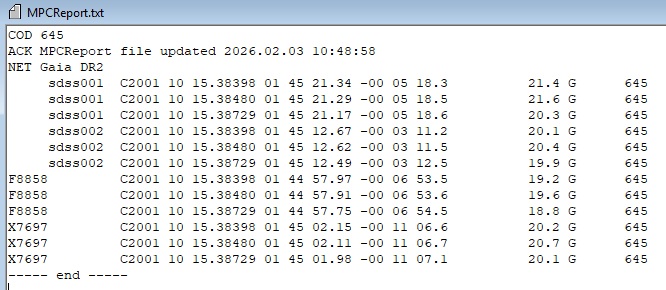
The sought asteroid is one of sdss001 and sdss002. In the
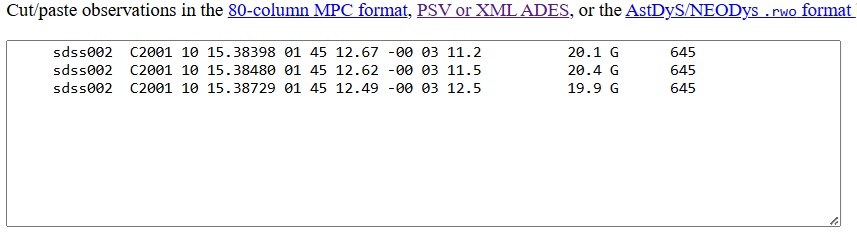

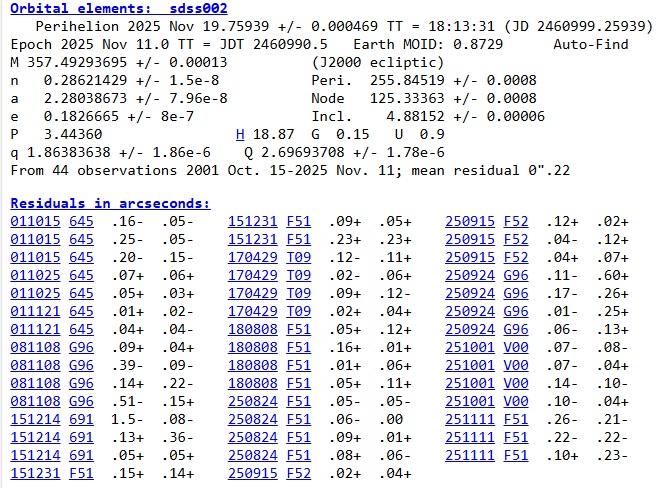
Calculate the orbit, then compare residuals from this calculation with the MPC value for asteroid 2001 UQ241. The
RMS value in the database is 0.40. After adding the observations of 15 October 2001 and recomputing the orbit,
the residuals for 15 October 2001 are close to 0.22 in the final orbital-elements row (mean residual). The new
observations reduce the overall RMS from 0.40 to 0.22. This checks that the new data belong to the same object. If
another object happened to be moving close to the position computed from MPC data, its brightness, speed, and
direction of motion would reveal it through increased residuals, showing that it is a different asteroid.
Another identification method is to check the observations using
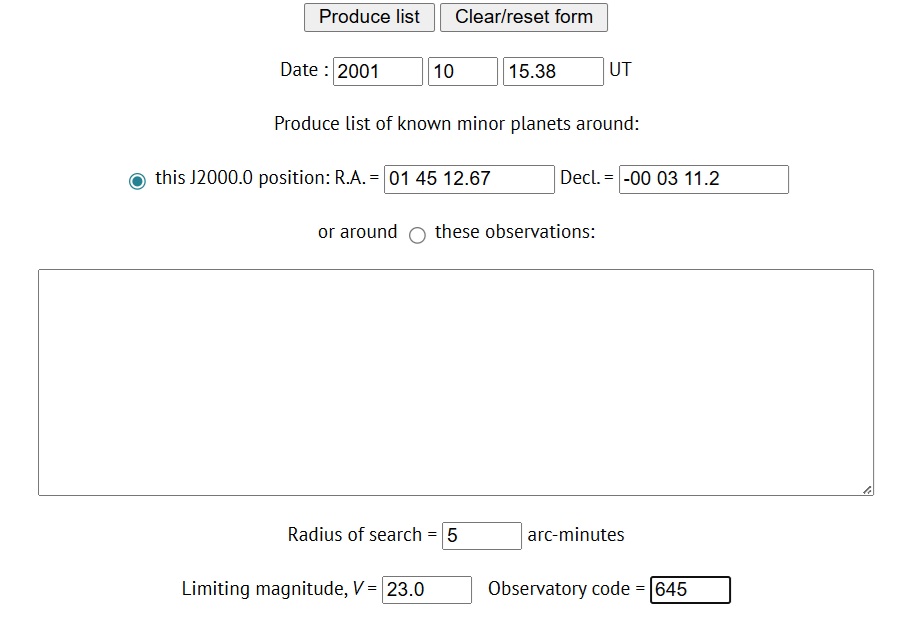
After entering the right ascension and declination of object sdss002 into the appropriate fields and entering the
observation time, the program checks whether an asteroid was present at those coordinates at that time. The
figure shows that Offsets R.A. a Decl. are 0.0, meaning that the measured object is asteroid 2001 UQ241.

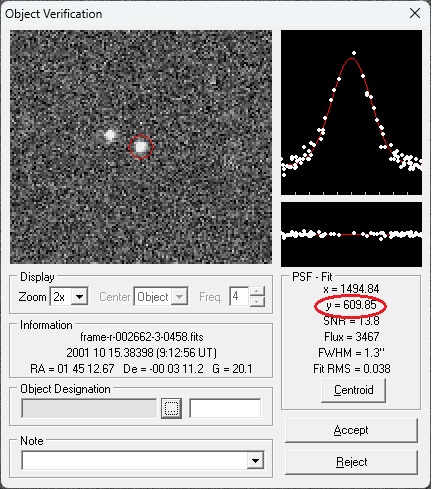
Substitute this value into the following expression: ((1480 - y)/37,5)/24/3600 = 0,0002685...
Round the result to
five decimal places: 0.00027. Add this value to the time of each observation.

Thus adjust the observation time as recorded by Astrometrica. Since the asteroid has been identified unambiguously, change the object code from sdss002 to K01U01Q, the packed form of the designation 2001 UQ241. More important than the object designation are the observation time and the measured right ascension and declination. Even if the designation sdss002 were retained, the system would still identify it correctly.

Checking for Duplicate Observations
So, we have the data ready for submission to the MPC, but before preparing the email to the MPC, I recommend performing a duplicate check. It is not enough to simply identify the moving object we detected; it is also advisable to verify that the data are not duplicates. The goal is to avoid sending data to the MPC that are already present in its database.
The verification process differs slightly depending on whether we are dealing with a known asteroid or with an object that is not listed in the MPC database. In our specific case, for asteroid 2001 UQ241, we found so-called pre-discovery observations from October 15, 2001. As described in the section Retrieving Images from the SDSS Archive, we determined this by checking the MPC Database Search. There we can see that the first observation is from October 25, 2001, which means that our measurements are certainly not already included.
If, on the other hand, we have found and measured the positions of a previously unknown object on archival images, the initial check is also carried out using the MPC, this time through the Minor Planet Checker. If we enter the coordinates of our discovery, the system should not identify any object corresponding to the given time and position. If the offsets in RA and Dec are non-zero but small, the object may still be a known asteroid with a very poorly determined orbit. Such a possibility can be ruled out using the online Find Orb service described above. Enter your observations into the large input field and the asteroid identified by the MPC Checker into the smaller field. The orbit calculation will immediately show whether the object is the known asteroid in question or not. If it is a different object, the mean residual as well as the individual residuals for each observation line will increase significantly.
Once we have confirmed that the object is not a known asteroid, I also recommend checking whether our measurements already exist in the ITF database. The ITF is essentially a database of one-night observations that could not be linked to any known asteroid. This check is somewhat more time-consuming, but I usually perform it as well.
Download the file itf.txt from the following page: MPC One-Night Observations.
The download link is located at the very bottom of the page. The file is compressed in "gz" format. After extracting it, open the file in a text editor such as EmEditor and use Ctrl+F to search for the right ascension of your observation. When searching, I usually enter only the integer value of the seconds component of the right ascension and then compare the declination with the value listed in the ITF. If you confirm that there are no entries in the ITF matching your measurements, you can finally begin preparing the email for submission to the MPC.
Submitting Observations to the MPC
Since August 2025, the MPC has introduced a new verification process for people submitting observations from public archives. The MPC now keeps track of which contributors submit measurements from particular archival data sources and links archival observations to observing program codes. A detailed description can be found here:
Therefore, anyone wishing to submit measurements must first pass the verification process. For SDSS data, the designated reviewer is Tyler Linden. His email address is tlinder34 [at] gmail [dot] com. As part of the application, you must submit sample measurements so that the accuracy of your astrometry can be evaluated. The assessment focuses primarily on the observation time and on the accuracy of the measured positions in both right ascension and declination. The expected accuracy is typically in the range of 0.1 to 0.3 arcseconds. If your measurements meet the required standards, you will be assigned a code that will subsequently appear with all of your submitted observations. In addition to providing the measurements themselves, you should be able to demonstrate their scientific value. This typically means extending the observed arc of the object and improving the determination of the asteroid's orbital elements.
Once approval has been granted, you may begin submitting your measurements from the archive. The email I sent with the measurements for the object that I identified as 2001 UQ241 looked like this:
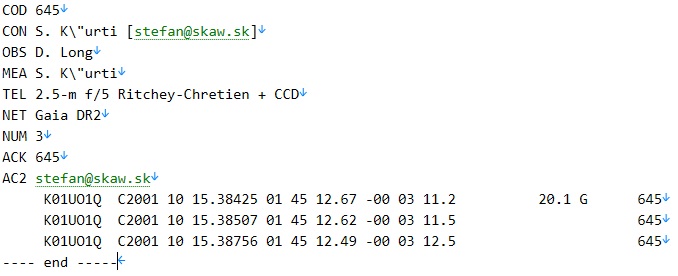
In most cases, the submitted data are processed within 24 hours, and the corresponding object record in the MPC database is then updated accordingly.
If you run into any problems during your search and are not sure how to continue, feel free to get in touch with me. I'll be happy to help and offer guidance. --->>> here!
I wish you good luck and plenty of enjoyment in your search. Hopefully, you'll uncover some interesting precoveries and help extend the observational history of asteroids.